

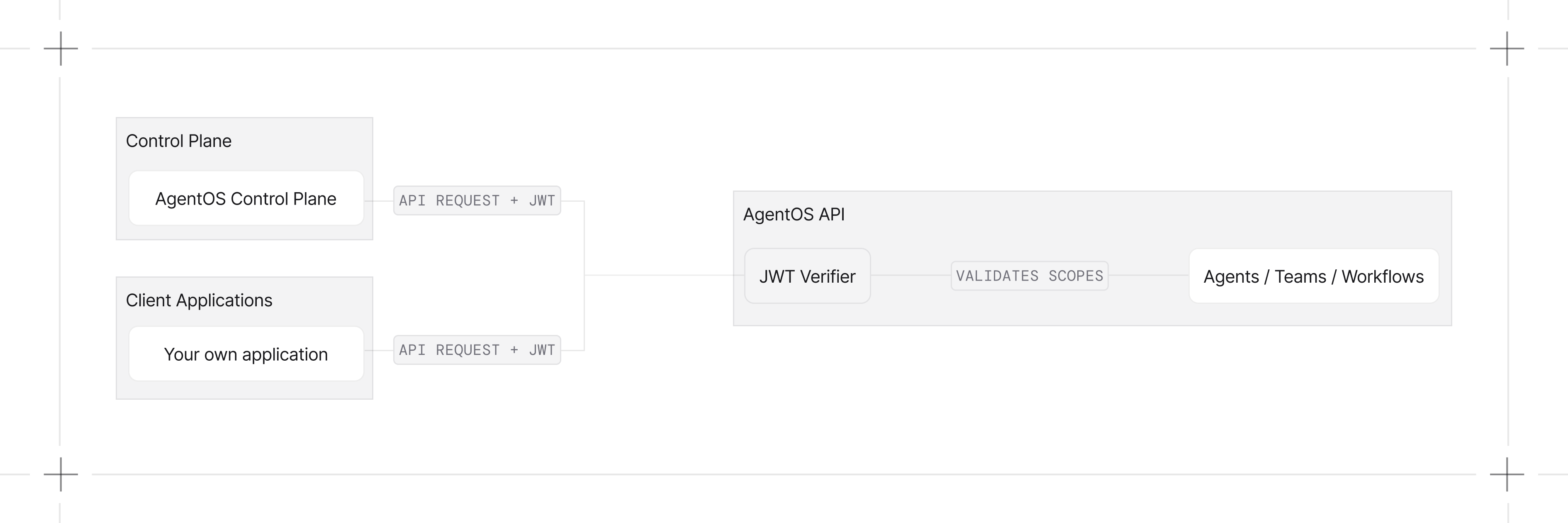
Quick Start
Enable RBAC when initializing AgentOS:Generate a Verification Key
authorization=True only tells AgentOS to enforce JWT authorization. To verify tokens, AgentOS also needs a public key. Generate one from the control plane and wire it in.
1
Toggle JWT authorization
Enable JWT authorization when connecting a new AgentOS, or later from the OS Settings page.
2
Copy the public key
Copy the public key for your AgentOS from the modal
3
Set the verification key
Set the Or, if you manage keys via a JWKS file, point AgentOS at it instead:
JWT_VERIFICATION_KEY environment variable to your public key in your .env file or export it directly in your terminal:The control plane only issues RS256 keys, which is also the default. See authorization troubleshooting for common setup issues.
Configuration Options
Configure JWT verification usingAuthorizationConfig:
Running AgentOS Independently
The control plane is one way to issue verification keys, not the only way. AgentOS verifies any JWT signed with a key you provide, so you can mint and verify tokens entirely on your own infrastructure.Issuing tokens
AgentOS verifies tokens but doesn’t issue them. Generate them in your backend or identity provider, signed with the key whose public half or shared secret you set as a verification key. Include the claims from JWT Token Structure;scopes is the claim RBAC checks.
Send the token in the Authorization header:
Accepting multiple issuers
verification_keys is a list. AgentOS tries each key in order until one verifies the token. Pass a second key to accept tokens from both the Agno control plane and your own backend at the same time.
algorithm.
JWT Token Structure
Your JWT tokens should include:Example Tokens
Read-only access:Scope Format
RBAC uses a hierarchical scope format:Scope Reference
Scopes split across two enforcement layers. Platform scopes are checked by the control plane. AgentOS scopes are checked by your runtime against incoming requests. Anyresource:action scope also accepts a resource:<id>:action form to limit access to a specific resource. See Scope Format.
The agent_os:admin scope grants full access to every AgentOS endpoint below.
Platform Scopes
AgentOS Scopes
- Config
- Registry
- Components
- Agents
- Teams
- Workflows
- Sessions
- Memories
- Knowledge
- Metrics
- Evals
- Traces
- Schedules
- Approvals
Access Prerequisites
A few scopes gate access in the platform. Without them, finer-grained scopes have no effect because the user cannot reach the resources they apply to.Default Roles
Every organization comes with three default roles.Custom Roles and Scopes
Custom roles and scopes are available on the Enterprise plan. Book a call or email support@agno.com to enable.
Create a Custom Role
- Open the Roles page in the control plane.
- Define a role name and select the scopes it grants.
- Save the role.
Assign a Role to a User
Open the Organization settings page and assign the role to a user.Custom Scope Mappings
Customize or extend the default scope mappings using the JWT middleware:Per-User Data Isolation
RBAC controls which operations a caller can perform. Per-user data isolation controls which rows a caller can see and write. Opt in withuser_isolation=True:
sub claim as the user_id for every non-admin caller:
A caller holding
admin_scope (default agent_os:admin) bypasses isolation and sees all data. Set a custom override with admin_scope="ops:admin".
Isolation is off by default. JWT/RBAC still apply when
user_isolation=False, but routes operate on the unscoped database and add no per-user ownership gates on top of RBAC. Per-user isolation requires a database that records user_id (PostgreSQL recommended for production).Excluded Routes
These routes are excluded from RBAC checks by default:/, /health, /info, /docs, /redoc, /openapi.json, /docs/oauth2-redirect
Error Responses
Examples
Basic RBAC (Symmetric)
Enable RBAC with a shared-secret JWT (HS256)
Basic RBAC (Asymmetric)
Sign with a private key, verify with the public key (RS256)
Per-Agent Permissions
Grant specific permissions to specific agents
Per-User Data Isolation
Scope sessions, memory, and traces per user with user_isolation=True
Developer Resources
JWT Middleware
Configure token sources, claim extraction, and scope checking
AuthorizationConfig Reference
Configuration options for JWT verification
JWTMiddleware Reference
Complete JWT middleware class reference